Adeline Cook

Adeline Cook  /  Nova

Case Study: Nova.

An open-source Smart Home Control Surface designed to be installed and extended by the user's existing frontier coding agent, for the things a household uses every day: lights, climate, reminders, energy, media and voice.

Product overview

One calm interface
for a complicated house.

Nova sits above Home Assistant and turns a collection of devices and services into one household interface. It provides the framework the owner's existing frontier coding agent uses to build the controls required for the actual devices in the house, rather than shipping a fixed catalogue of device panels or its own installer agent. The resulting zones, controls and themes stay consistent across the wall panel, browsers and Apple TV. Voice processing remains local. Services can run on one machine or be distributed across several, while the household sees one coherent control surface. A public demo appears further down the page.

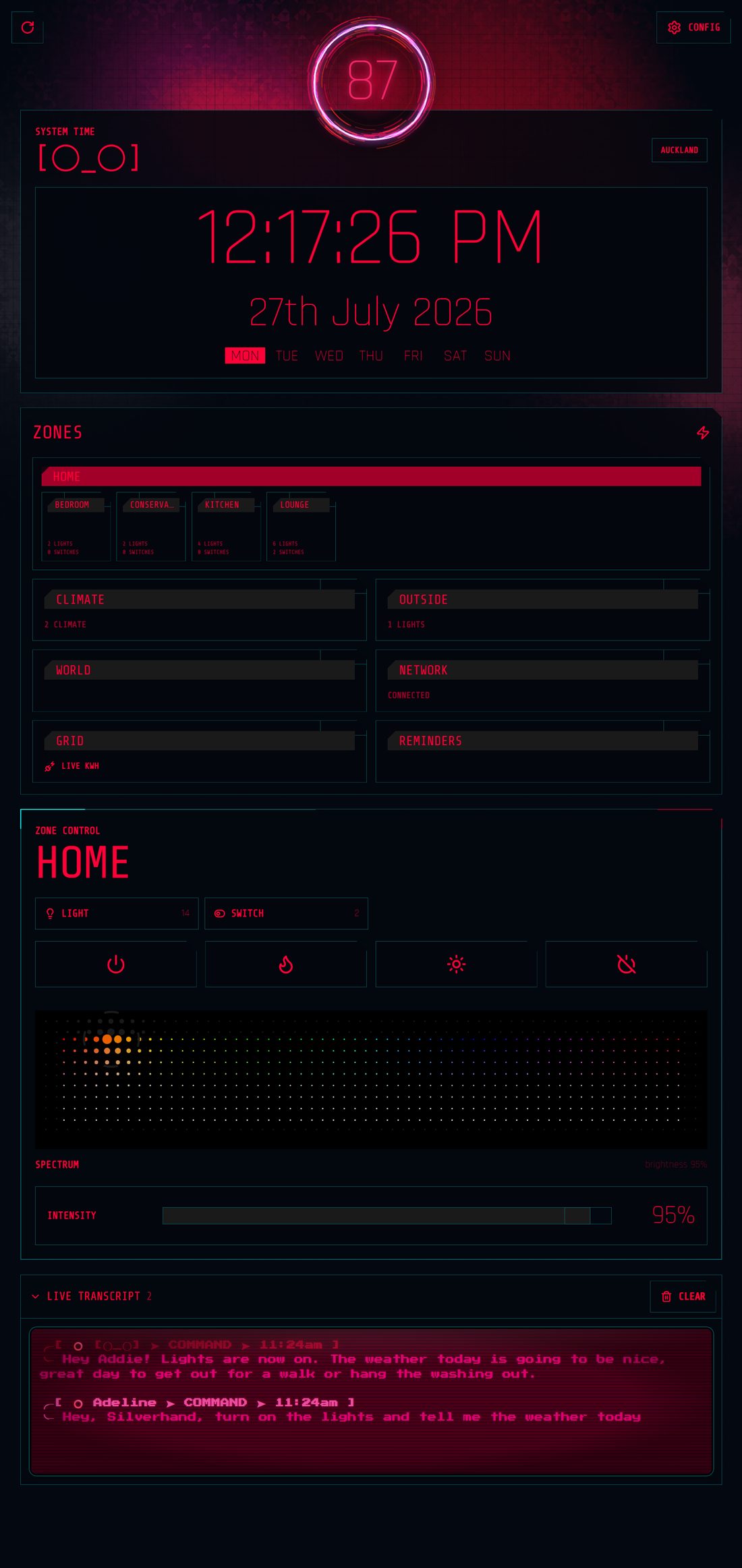
The Nova dashboard: system clock, zone grid across five rooms, and whole-home zone controls.
Nova — live demo build
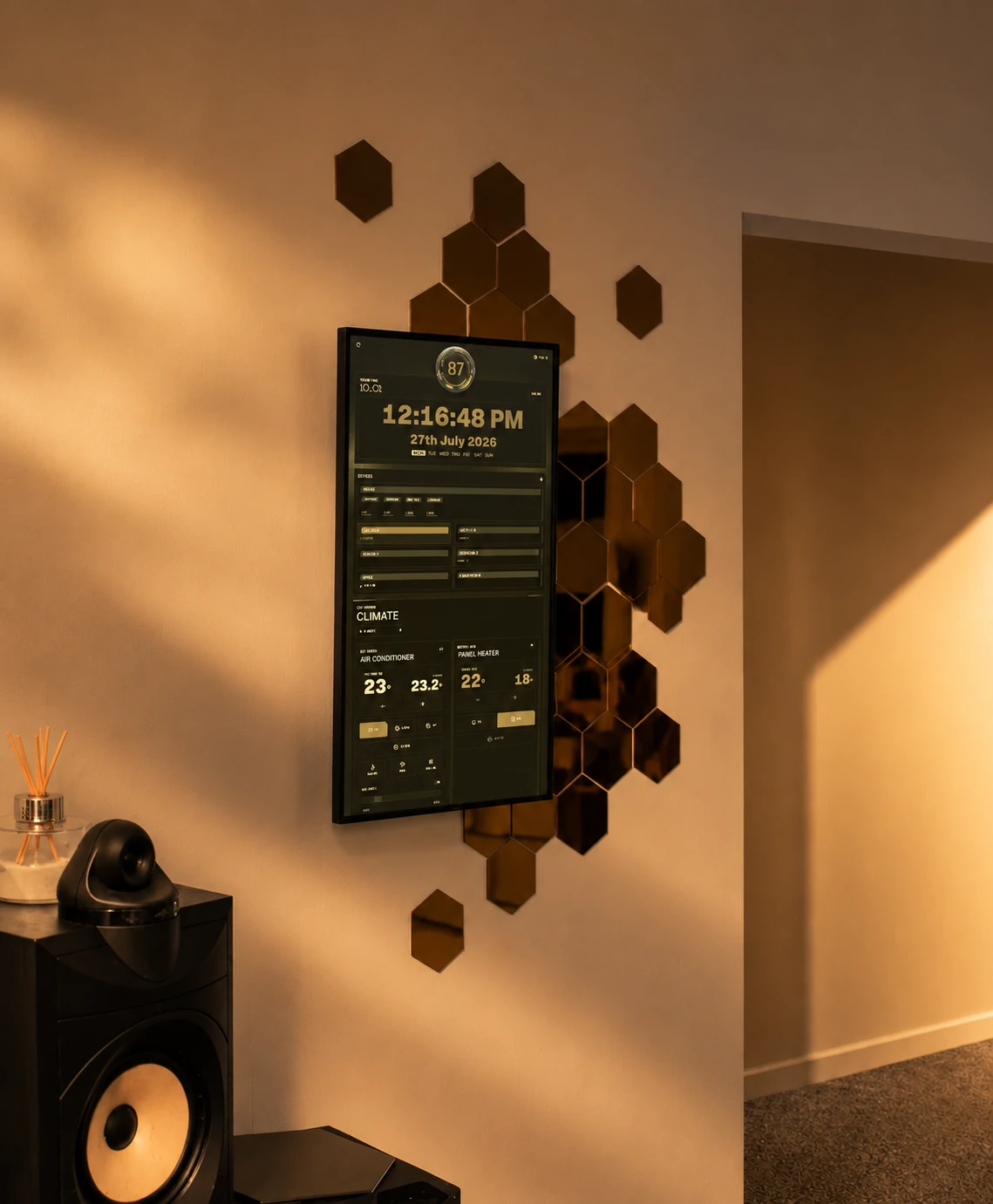
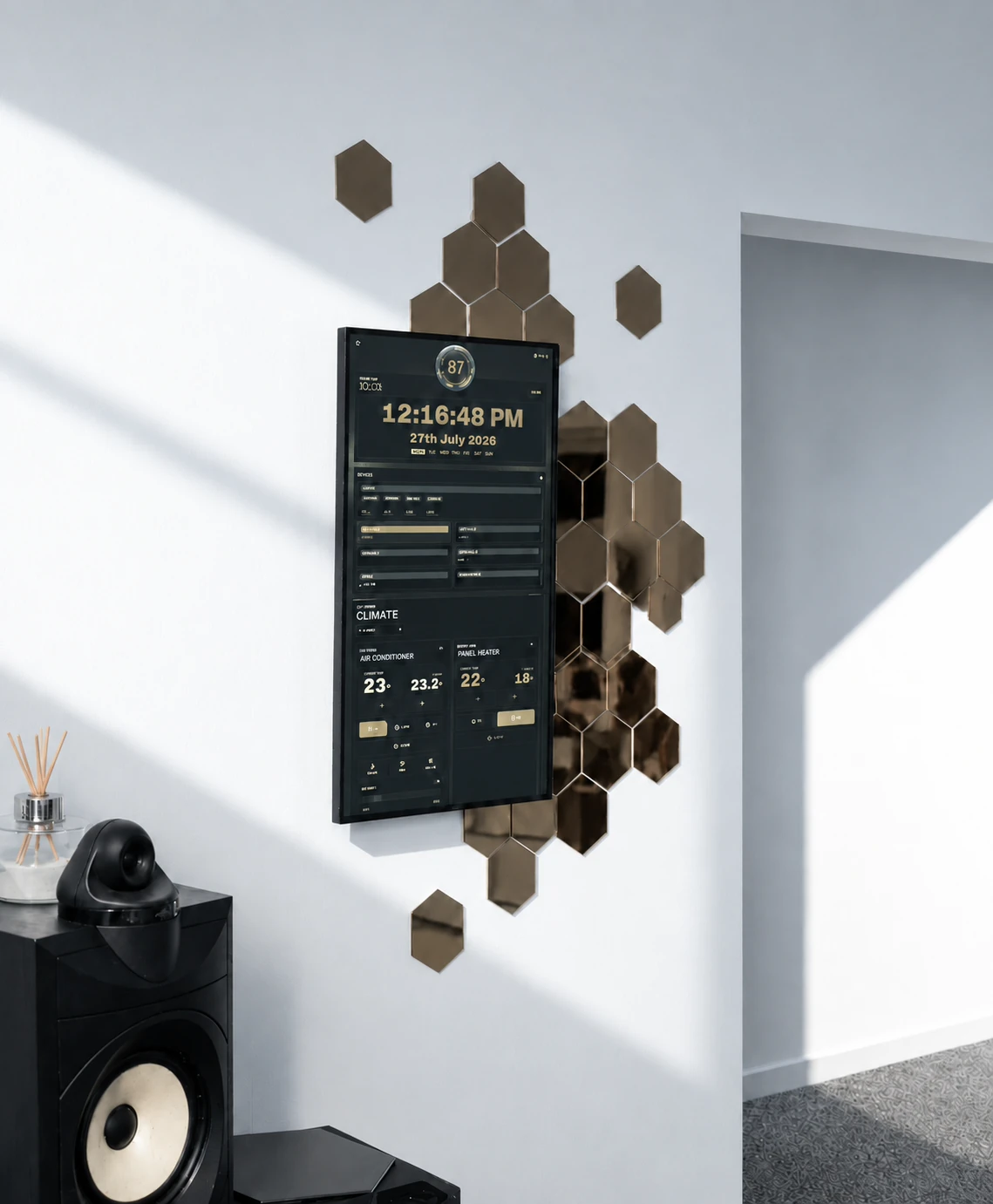
The Nova panel mounted in portrait on a white wall, showing the climate screen in a gold theme, surrounded by copper hexagonal wall tiles, with a studio monitor below it.
Touchscreen kiosk
LocalVoice processing
stays in the house
2Web and native
client platforms
OpenSource, installation
and extension tooling

Private by design

The voice assistant runs inside the house.

Wake-word detection, transcription, the language model, speech synthesis and speaker recognition all run together on a 2018-era GPU. Conversations are not sent to a cloud service, an internet outage does not remove the core voice path, and there is no metered inference bill attached to ordinary use. The complete conversational stack is tuned to fit within 7 GB of VRAM so the system can run on capable hardware the household already owns.

Adaptive speaker recognition

Enrolment happens through normal conversation.

A household member can identify themselves during a conversation and Nova begins an acoustic profile. Subsequent speech refines that profile across different rooms and microphones, capturing enough environmental variation for reliable recognition throughout the house. Enrolment behaviour, recognition thresholds and individual profiles are all adjustable from the configuration workspace.

An interruption-aware dialogue controller preserves the active turn as a request develops. Late additions can be folded into the current statement; when they materially change the intent, Nova cancels and restarts handling against the revised request. Follow-ups retain conversational context without another wake word, and cross-room arbitration ensures that only one satellite responds.

Self-hosted · local inference · used daily

What it does

Many screens, one extensible framework.

Lighting & zones

Whole-home control

Lights, switches, climate, fans, covers and humidifiers are organised by room and zone. A single control can affect one fixture, a room or the whole house. Schedules handle routine changes such as lowering lights in the evening, while exclusions and presets prevent broad commands from touching the wrong device.

Voice

Context-preserving turns

Small voice satellites can be placed around the house. Follow-ups, interruptions and late additions remain part of the active request, while arbitration chooses one room to answer when several microphones hear it. Noise suppression and echo cancellation prevent playback from re-entering the conversation.

Climate

Climate that settles down

A planner coordinates air conditioners and panel heaters around the household's target temperatures. Commands are queued and debounced so the dashboard respects device cool-down and polling periods instead of repeatedly correcting the same state.

Voice engines

Choose how Nova sounds

The dashboard supports preset voices, quick voice cloning from a small set of reference clips, and fully fine-tuned voices. Samples, training and voice selection are managed from the same configuration screen, along with accent, mood, speed and pitch where the selected engine supports them.

Power & network

Energy in useful terms

Live electricity use is combined with the household's actual tariff to show cost, estimates and account history alongside raw consumption. Network and host health remain available without filling the main household screen with infrastructure detail. A separate observability pipeline is used while developing and validating Nova; it is development tooling, not a feature deployed into every household installation.

Household information

Useful at a glance

Weather, rain radar, a local map, tasks, iCloud calendars, reminders and recent camera footage share the wall panel. Due items surface without being buried in a menu, while system health remains available without dominating the screen.

Mobile automation

A home that knows when you are on your way.

Nova does not stop at the wall panel. Through Tailscale, iPhone Shortcuts and Android Tasker can connect to the dashboard wherever a household member happens to be.

That makes the house feel more considered: a personal routine can prepare a room before arrival, settle things after departure, or put the controls that matter in reach from a phone. The same calm control surface follows the household beyond the front door.

Zones

Controls that match the house.

These screens are captured from the wall panel. Drag to explore a screen or open it at full size.

The Nova home zone: system clock, a zone grid with Home expanded into bedroom, conservatory, kitchen and lounge sub-zones, Outside as its own zone, and whole-cluster lighting controls with a spectrum picker.
Zones — grouping and sub-zones

Rooms, groups and exceptions

Zones can contain other zones, allowing the same control pattern to cover a fixture, a room or a whole branch of the house. Devices can also be excluded from their parent's broad commands. Membership and nesting are configuration, so the interface follows the household rather than forcing the household into a fixed plan.

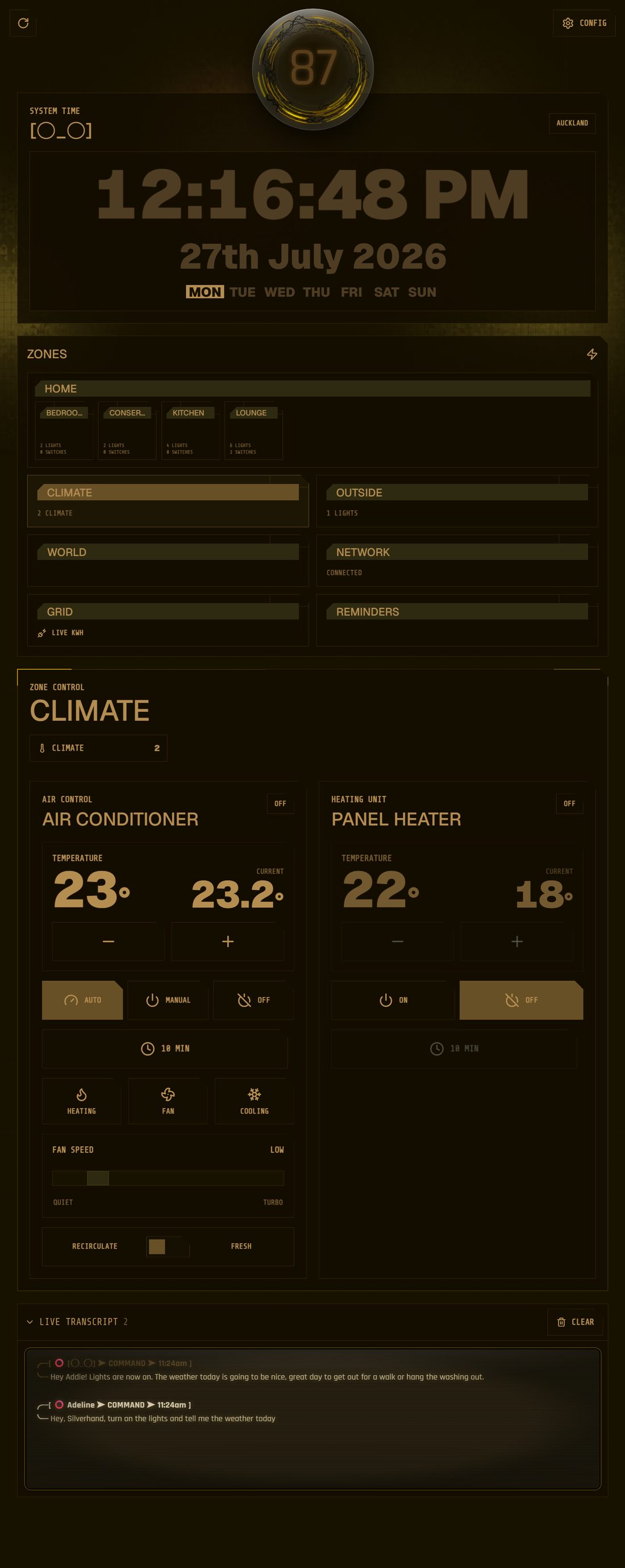
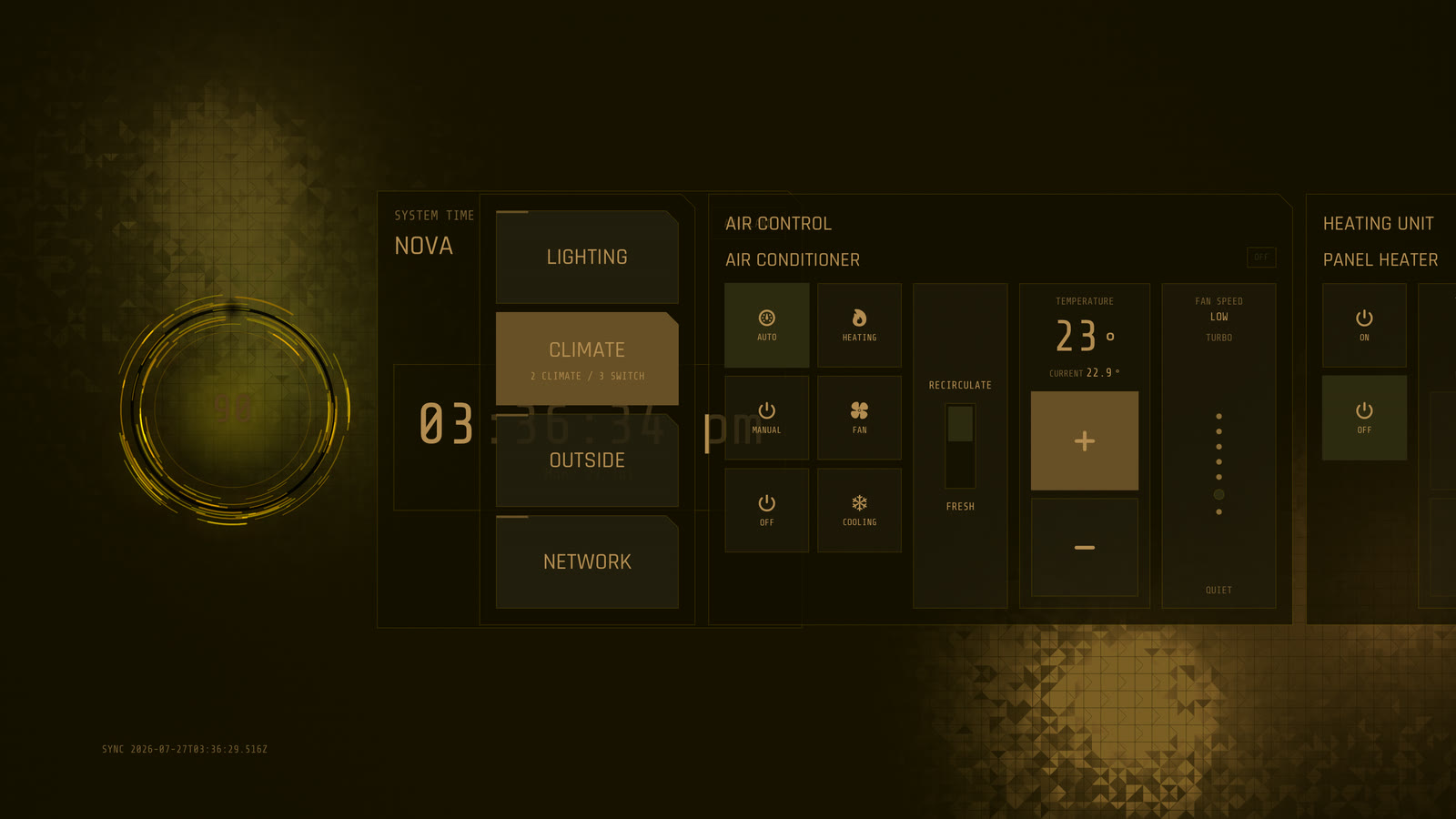
Nova's climate zone: an air conditioner with target and current temperature, auto, manual and off modes, a timer, heating, fan and cooling modes, a fan speed slider and a recirculate or fresh air toggle, beside a panel heater with only on and off.
Climate — two unlike devices

Only the controls a device has

An inverter air conditioner and a plug-in panel heater share this screen. The air conditioner gets modes, a timer, fan speed and a fresh-air damper. The heater gets on and off. Each control comes from the capabilities reported for that device, avoiding dead controls and special-case screens.

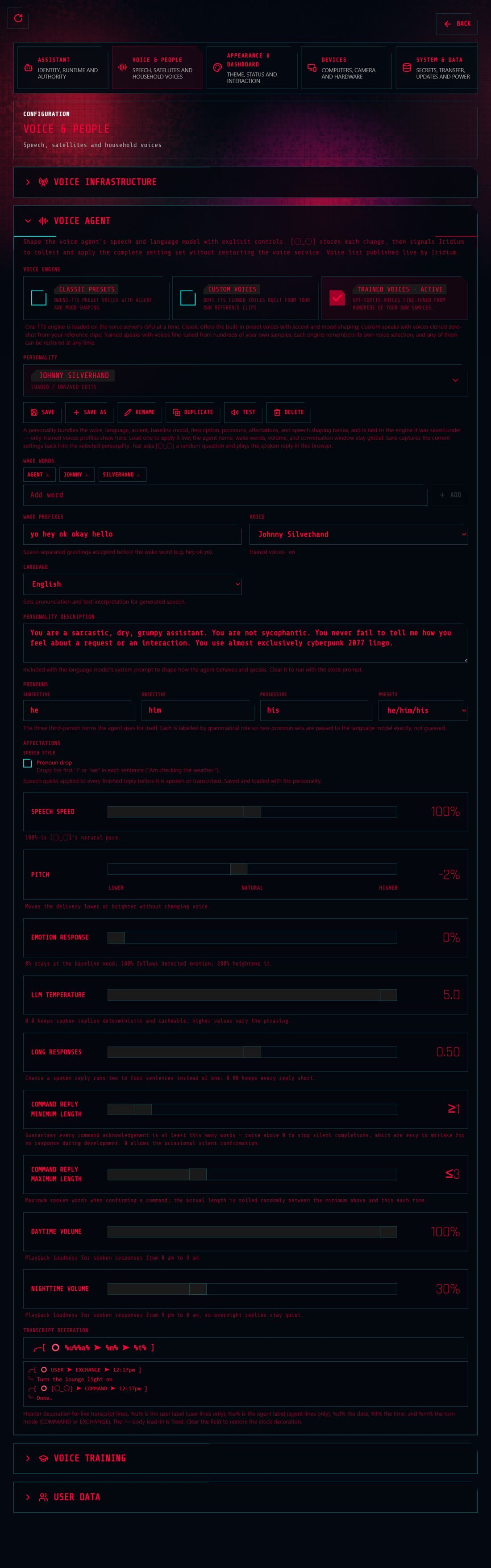
Nova's voice agent configuration: three selectable speech engines, a saved personality, wake words and wake prefixes, language, personality description, pronouns, and sliders for speech speed, pitch, emotion response, model temperature and reply length.
Voice agent — engines and personality

Voice and behaviour stay together

Speech engine, wake words, pronouns, conversational style and delivery controls save as one assistant profile. Speaker profiles and recognition tuning live alongside it. Changes take effect without requiring a service restart.

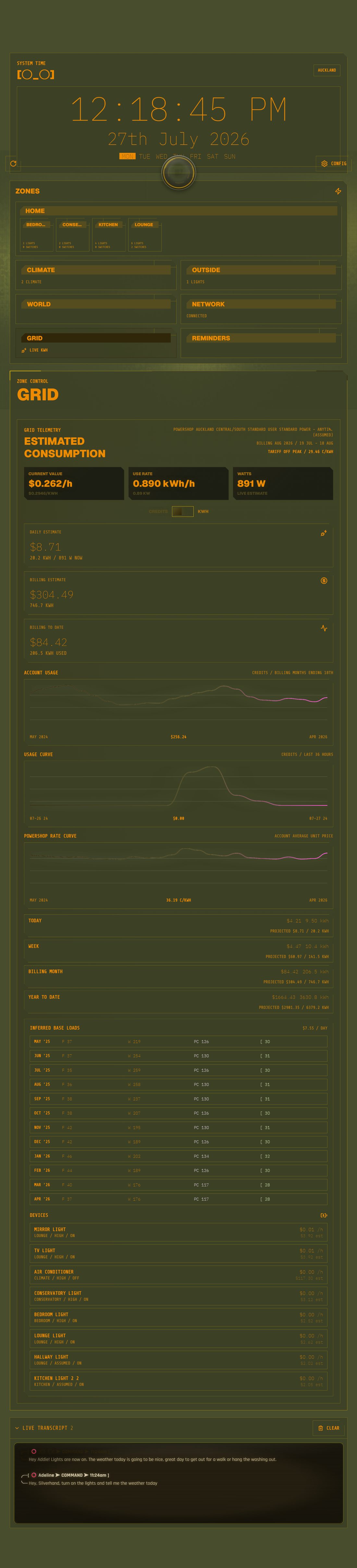
Nova's grid telemetry: current value in dollars per hour, use rate and watts, daily and billing estimates, account usage and rate curves, projections for today, week, billing month and year, modelled monthly base loads, and a per-device cost table.
Grid — consumption and cost

Cost alongside consumption

Current draw is resolved against the household's real retailer tariff, turning the current draw into an estimated cost per hour. The same screen shows projections, retailer history, modelled base load and a per-device view of current demand.

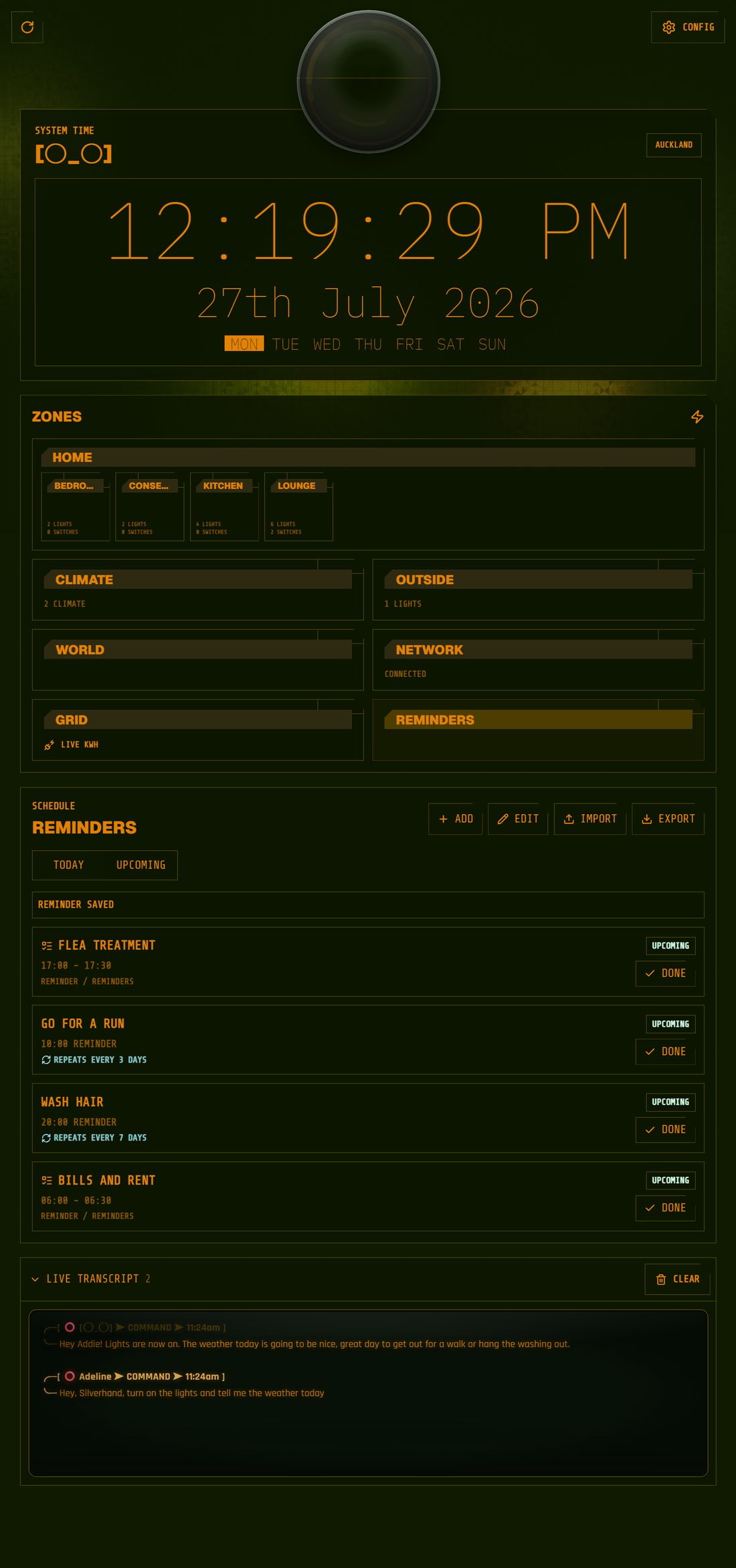
Nova's reminders schedule: today and upcoming views, four reminders with times, repeat intervals and done buttons, and add, edit, import and export controls.
Reminders — the household schedule

Shared reminders

Timed and recurring reminders, with today and upcoming views, marked done from the wall or by voice. Due reminders can be announced in the relevant room, and the complete set can be imported or exported as data.

How it fits together

Different devices, one consistent system.

Nova's clients render controls from a shared schema and the capabilities reported by each service or device. The wall kiosk, configuration workspace and native Apple TV app do not carry separate lists of supported hardware. When a capability is added, the relevant controls appear wherever they belong.

The same approach keeps three very different speech engines behind one interface. One provides expressive preset voices, one clones from a small set of clips, and one runs a fine-tuned voice model. Each publishes the settings it supports. That makes the choice of speed, likeness or delivery a household setting, while the clients remain independent of the engine underneath.

Client Wall kiosk Client Apple TV (native) Client Browser / mobile Client Room satellites Host role Dashboard Next.js control surface Versioned JSON config Operations API Devices Home Assistant Voice role Wake · STT · LLM · TTS Media role Capture & DVR Development observability NATS · Grafana

One answer, in the right place

Several rooms may hear the same sentence. A household-wide arbiter selects one satellite to own the turn, while layered echo defence prevents the system from hearing its own reply as a new request.

Installed by your frontier agent

Structured operations tools and packaged skills are the installation and extension interface. Your existing frontier coding agent can provision one host or several, then add the device-specific controls the household requires. Nova does not bundle an installer agent.

Interaction design

Built for a glance and one hand.

The wall panel is read from across the room and touched in passing. The clock and status orb own the resting view, while the zone grid stays in place as controls change beneath it. Large touch targets suit one-handed use. Due reminders surface across the interface instead of waiting behind a tab. During an interaction, incoming device updates pause briefly so the control does not jump under a finger. If the network drops, the last good reading remains visible. Lite mode keeps the same layout on weaker hardware and removes only the expensive visual effects.

Shared behaviour

Web and Apple TV,
reading the same contract.

One versioned schema defines zones, thresholds, capabilities and design tokens for both runtimes. Validation and a dry-run import catch incompatible configuration before it reaches a device. A change is made once and interpreted by each client in its own native controls, reducing drift without forcing the two interfaces to share an implementation.

A native app for one household

The tvOS client is open source and agent-extensible. A frontier coding agent can adapt its controls, layout and behaviour for a particular installation, then build and install it directly on the household's Apple TV through Xcode. Apple supports local device testing with a free Personal Team, so this path does not require an App Store release or paid developer membership. Nova's current Xcode-managed development profile is valid for one year; when it expires, the same local build and deployment can be repeated. The result is boutique, agent-built software for the home: specific to the household, locally deployed and under its control.

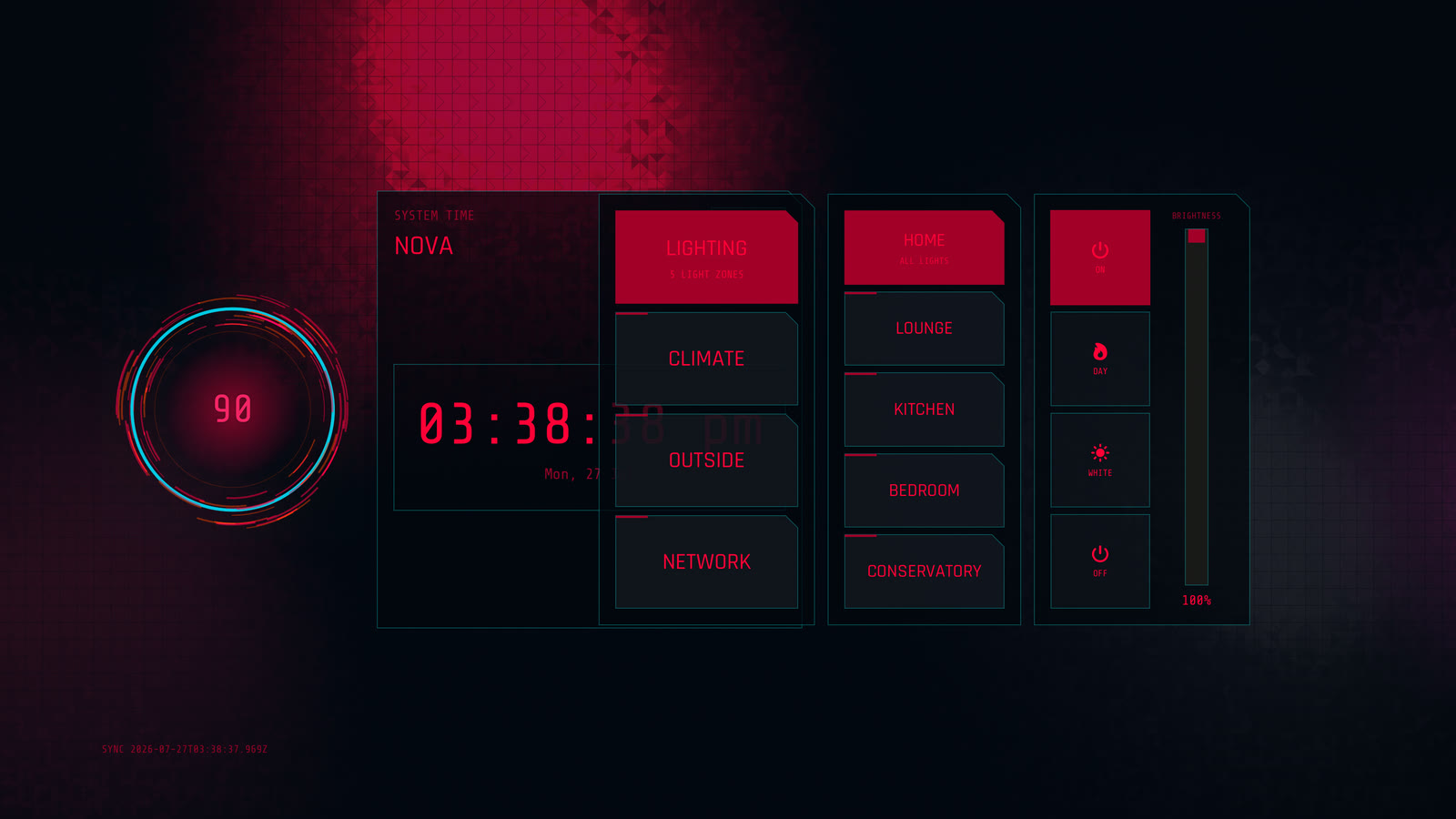
The native Apple TV app in a red-on-black cyberpunk theme, showing the lighting screen with zone buttons for lounge, kitchen, bedroom and conservatory beside a brightness slider.
Lighting — Cyberpunk theme
The same Apple TV app in a gold Human Revolution theme, showing the climate screen with air-conditioner modes, a temperature setpoint of 23 degrees and panel-heater controls.
Climate — Human Revolution theme

Try it yourself

The whole dashboard runs in your browser.

A real Nova build runs on GitHub Pages with simulated data and no access to household devices or personal information. Change the theme, move through the zones and open the configuration workspace.

Open the live demo

Source

One project, three public repositories.

Nova is maintained across its web dashboard, voice runtime and native Apple TV client. Together they include the portable configuration schema, wake-word pipeline, turn arbitration, speech engines and tvOS control surface. The demo build allows the interface and automated tests to run without live household devices.

Installation & extension

The framework builds the controls the house needs.

Nova does not ship a catalogue of fixed control panels. It ships the open framework: a shared schema, capability model, operations surface and packaged skills. The intended installer is the user's existing frontier coding agent, working from the devices, rooms and computers available in a particular household. Nova does not ship with an agent capable of installing itself. The owner provides clarity of purpose, household constraints and direction on the choices that materially affect them.

Have a ChatGPT Plus or Claude subscription? You already have the frontier coding agent Nova expects you to use. It installs and configures Home Assistant where needed, inspects the available hosts, resolves dependencies, assigns dashboard, voice, media and monitoring roles, connects the declared hardware and runs the deployment. The owner weighs in on important choices; the agent handles the setup and verification. The process is repeatable and reviewable whether Nova is installed on one machine or distributed across several.

Extension uses the same interface. For a new device, the owner's agent can add the adapter, capability description, controls and verification needed for that device instead of waiting for a prebuilt panel to exist. The shared contract then carries the new support to each relevant client. Configuration validation and dry-run imports make the proposed result inspectable before it reaches the live household.

Recommended stack

The packages and models behind the working system.

These are Nova's current, tested choices—not a bundled appliance. The owner's frontier agent installs the relevant parts, pins compatible versions and adapts the topology to the available hardware.

Home & application

Home Assistant is the device layer, with Mosquitto and Matter Server where the household's hardware needs them. The control surface uses Node.js and Next.js; voice and operational services use Python. FFmpeg handles media capture and DVR work, with systemd managing long-running services on Linux hosts.

Access, memory & source

Tailscale is the recommended private access layer between the owner's machines. MemPalace gives the frontier agent durable project and household context. Git carries the public software and specification, while the specification keeps credentials and private household data in designated stores outside version control.

Voice understanding

The local voice path uses Silero VAD, NVIDIA Nemotron Speech Streaming EN 0.6B for speech recognition, Qwen3.5-4B Q4_K_M through llama.cpp for interpretation, and NeMo TitaNet-Large for local speaker identity. DeepFilterNet3 provides CPU-side noise suppression. Wake words are matched in the speech transcript; Nova does not run a separate acoustic wake model.

Voice output

The selectable output engines are Qwen3-TTS 12Hz 0.6B CustomVoice for preset voices, dots.tts MeanFlow for zero-shot cloned voices, and GPT-SoVITS v2 for fine-tuned voices. Exactly one TTS engine is resident at a time; they are alternatives behind one Nova contract, not an ensemble that loads every model for each response.

Development observability

NATS and Grafana support the observability pipeline used to measure, diagnose and validate Nova during development. This pipeline is a development tool, not a Nova feature that installers are expected to deploy in the household.

Design priorities

What the system is built to protect.

A household system earns trust quietly: it preserves privacy, behaves predictably and recovers without turning ordinary users into operators.

Privacy

Keep speech inside the house

Conversational audio and inference stay on local hardware. Public repositories contain the software, while household addresses, hostnames, credentials and device details remain outside version control. The specification directs agents where sensitive information must be stored, so the repositories are safe to fork, commit and push.

Familiarity

Keep the layout stable

Rich and lite modes share the same information hierarchy. Web and tvOS use the same zones, capabilities and design tokens, allowing visual treatment to change without moving the household's controls around.

Resilience

Fail without losing the whole interface

The dashboard retains the last trustworthy state through short network interruptions. Voice and media paths have watchdogs and bounded recovery steps, so one unhealthy service does not require the household to restart the stack.

Extensibility

Describe capabilities once

Device and service capabilities flow through a shared schema. Adding supported hardware is primarily a configuration task, and clients render only the controls that make sense for that hardware.

Operability

Use observability during development

The development observability pipeline collects metrics and logs while Nova is measured, diagnosed and validated. It is development tooling, not a deployed household feature. Production deployments still coordinate dependent services and count as complete only after the running system has been verified.

Development approach

Fast iteration with enforceable boundaries.

Coding agents contribute implementation across Nova. Architecture, acceptance criteria, review and release decisions remain explicit human responsibilities.

Agent-assisted development increases the amount of work that can be attempted in parallel, which makes vague requirements and weak review more expensive. Nova keeps the behavioural specification in the repository and requires it to move with the implementation. Golden snapshots protect dashboard state, end-to-end tests run against the public demo, and source checks guard feature parity between rich and lite clients.

A shared task log records ownership and blocks overlapping changes. Dashboard and voice releases move through one dependency chain, so a partial deployment cannot be mistaken for a finished one. Packaged operational instructions give both people and automation the same deployment contract.

The development loop is deliberately ordinary: define the behaviour, make a change, run the relevant checks, inspect the result and update the specification when the design has genuinely changed. Agent tooling makes that loop faster; it does not replace it.

Measure before and after

Performance work starts with a real bottleneck and ends with the same workload measured again. Findings are folded back into the specification and operations tooling so the improvement survives the next change.

Measure Diagnose Change Re-measure Update spec the contract moves with the code Update tooling the agent gets better at the job

For example, moving the media capture path from software processing to a hardware-accelerated pipeline returned most of the host CPU to the rest of Nova:

Software video pathCPU saturated multiple cores occupied
Hardware-accelerated path~14% CPU capacity returned to the host

Verification

Unit, component, planner and end-to-end coverage can run against simulated data without access to live household devices.

Release safety

Dependency-aware coordination prevents dashboard and voice changes from being released as incompatible partial updates.

Privacy

Household specifics live outside version control. The software is public; addresses, hostnames, credentials and keys are not.

Ongoing project

Nova continues to evolve.

The public demo and three open-source repositories track the working web and tvOS control surfaces, voice runtime, configuration model and agent-facing extension tools.

Open the demo